We teach
kids to create, not just consume.
Screen time shouldn't be passive. With live math, coding and robotics classes your child builds their own projects.
- Live classes
- Safe space
- Parent reports
- Cancel anytime
AlgoMathKids in short
- What is AlgoMathKids?
- An education platform offering live, online maths, coding, robotics and algorithmic-thinking lessons for children aged 6-12.
- How do the lessons work?
- Every lesson is live on video with a teacher — one-to-one or in a small group. Nothing is pre-recorded: your child talks, asks and builds in the moment.
- What level does my child start at?
- A six-year-old writing their first block of code and a twelve-year-old ready for Python both start from their own level.
- How do we start?
- With a free trial lesson. We don't ask for a credit card, and after the lesson whether you continue is entirely your call.
What parents love most
Why AlgoMathKids?
Small groups, live lessons, and projects kids actually care about.
Transparent Tracking via Parent Panel
After every lesson, progress reports, homework and feedback land in your parent panel — you always know what your child is learning.

Learning That Feels Like Play
With points, badges and levels, kids don’t get bored while learning.
Skills That Stick
Coding, logic and math. Useful in school today and well beyond.
Learning Together
They learn alongside peers and stay motivated with friendly challenges.



What do they learn at each age?
Each age has its own starting point.
Your child can make their own game, not just play one
They drag and drop colorful blocks, test the game right away, and share it with their class. They learn to code by building a game.
- Codes with colorful blocks
- Tests the game in one click
- Shares with the class, earns likes
Tap the colorful blocks to change the game instantly — then play!
Start today — what will your child be doing 6 months from now?
A concrete program with concrete outcomes. Here's what to expect, week by week.
First live lesson, first "aha" moment
They meet their teacher and start at their own level. By the end of the first lesson, they've already run their own first mini program.
Publishes their first own game
They share the game they built with blocks with their classmates. They're no longer just playing on screen — they're showing what they made.
Moves on to real code and algorithms
They take the step from block-based coding to writing real code — learning to break a problem down and solve it step by step.
Has a portfolio of projects to show
After 6 months, they have their own games, solved problems and a capstone project — not just a certificate, something real.
Try the first lesson free — see today where you'll be in 24 weeks.
Starts with Scratch, builds a real 3D game in Unity
From drag-and-drop blocks to a real 3D game — step by step. Your child builds their own game with the tools real studios use too.
Scratch
Ages 7–10 · BeginnerSnap colorful blocks together — your first game is ready.
What they’ll make
- Pick a character, build the scene, set the rules
- Add movement, points, sound and animation with blocks
- Test and share your game — let your friends play
More than just fun
Without a single typo, they learn to build logic, think step by step and turn imagination into something real. Built by MIT — the world's most widely used coding tool for kids.
Unity
Ages 11-14 · AdvancedCode your own 3D game in a real game studio engine.
What they’ll make
- Build a 3D scene: ground, light, camera, character
- Write movement, physics and rules with C#
- Build your game and run it on your own computer
More than just fun
They write a real programming language (C#) in the world's most widely used game engine — an early, hands-on start with tools they'll meet again in university and industry.
Your child doesn't type code — they snap blocks together
That's the core idea behind Scratch. Pick a block below and press “Run”: you'll see what your child does in class in about 15 seconds.
Blocks
The sequence
- move 10 steps
- turn 90°
- move 10 steps
- say hello
Stage
Blocks run top to bottom, one after another. Change the order and the result changes — that is the first rule of programming.
So what does this teach?
Sequencing, repetition and cause and effect. Children learn “if I do this, that happens” by trying it — then carry the same logic into their own game in Scratch.
This is exactly what the student panel looks like
These aren't design mockups — they are the product's real screens.
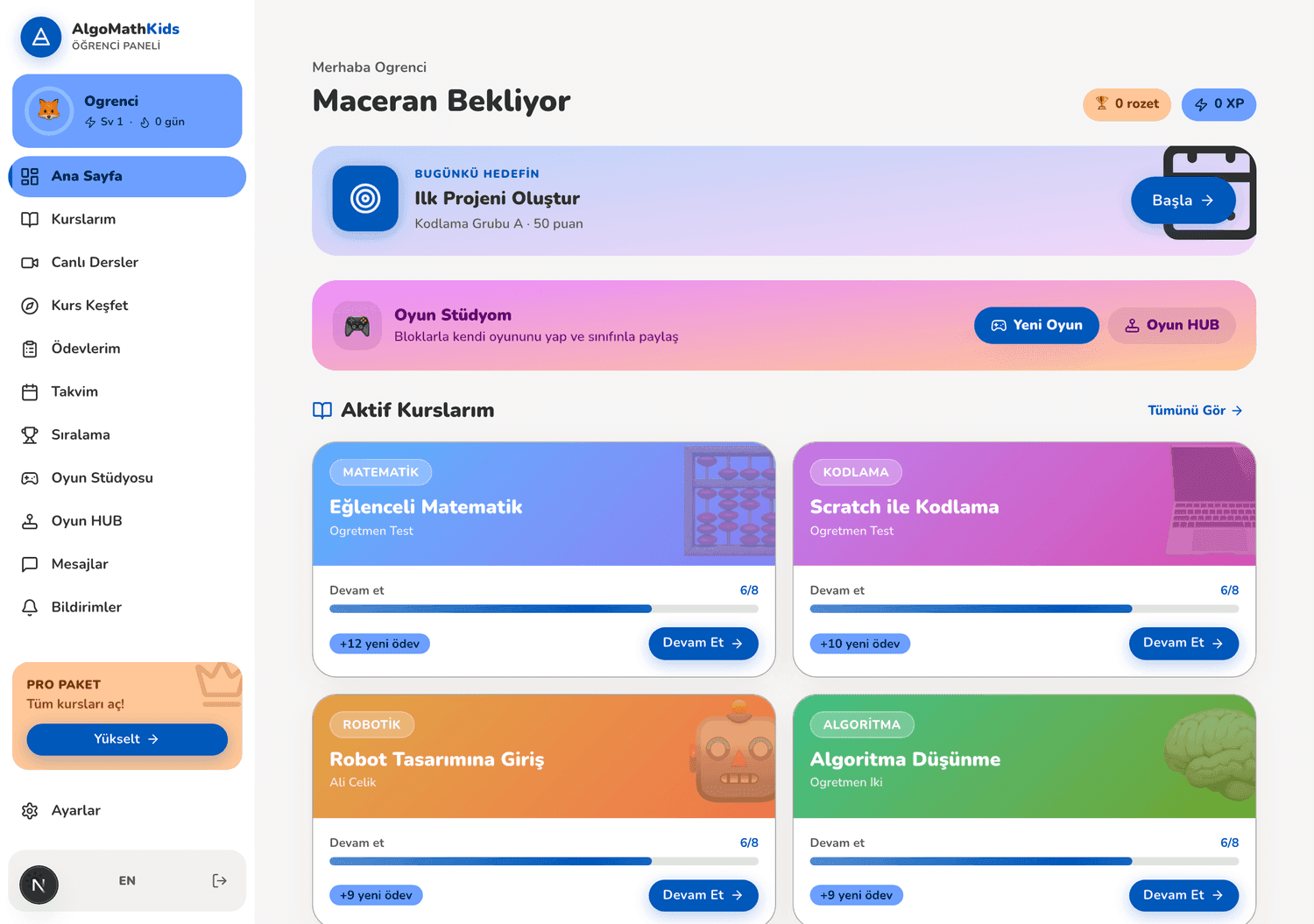
Your child knows what to do the moment they log in
Today's goal sits at the top, with active courses and progress underneath. There's no hunting for where to continue — “Continue” is one tap away.
What you get: no more “what should I do today?” negotiation — the next step is already on screen.
No credit card · We walk through the panel together in the trial lesson
What our students built
A few of the real games they coded with blocks 👇
A new game is added every week 🎮
Learning Areas
Explore gamified courses tailored to your child's age and interests.
Mathematics
Explore numbers, geometry and problem solving through gamified quests.
Algorithm
Build step-by-step thinking and logical problem-solving skills.
Coding
Build your first games and projects with blocks and real code.
Robotics
Program the physical world with sensors, motors and robots.
Logic
Sharpen critical thinking with puzzles and logic games.
The platform that makes learning fun
Tools that make learning easy, fun and measurable.
Live Classes
Interactive small-group sessions led by real teachers.
Smart Homework
Automatic grading, feedback and badge rewards.
Competitions
Keep kids motivated with individual and team tournaments.
- Live classTue 5:00 PM
- Homework8/8
- Contest#3 🏅
Who teaches the lessons?
All experienced in their field, and they know how to work with kids.
- Subject experts · 5+ yrs experience
- Trained in child pedagogy
- Only 8% of applicants are accepted
Mr. Emre
Coding & Scratch5+ yrs experience“I have been teaching kids to make games with Scratch for five years.”
Mr. Mehmet
Math & Algorithms8+ yrs experience“I love the moment a kid who feared math lights up.”
Mr. Kaan
Robotics & Design6+ yrs experience“In robotics class there is no rush; kids learn by making mistakes.”
What Parents Say
From families who trust AlgoMathKids with their children.
My daughter builds a new project every week — learning has become genuinely fun.
Ayşe Y.
Parent, age 9
The live classes are highly interactive. Teachers adapt to the child's pace.
Mehmet T.
Parent, age 7
Coding and math on one platform. Exactly what my kid needed.
Zeynep K.
Parent, age 11
Try it free first, then decide
Start without paying anything. After the free trial, we choose the right course for your child together.
- The first lesson is completely free
- No credit card or upfront payment
- Leave anytime, no commitment
Small groups — limited spots
Clear-priced, one-time courses
Buy each course once — no monthly subscription or commitment.
Scratch ile Oyun Kodlama - LVL1
Unity: Oyun Geliştirme
See the course page for exact pricing and current offers.
First lesson's on us. If you don't love it, you pay nothing.
Try it first, then decide. If you are not satisfied, we refund what you paid.
No credit card required
We never ask for payment details for the trial.
14-day money-back guarantee
Full refund within the first 14 days if not satisfied.
Cancel anytime
No commitment, no contracts. Leave whenever you want.
Build the future with your child
Request a free trial lesson and start your first class today.
No credit card required · No commitment